Reports
Reports give you quick access to production data without having to compile information
manually. You can use predefined reports, create your own, and schedule delivery to
specific users or roles.
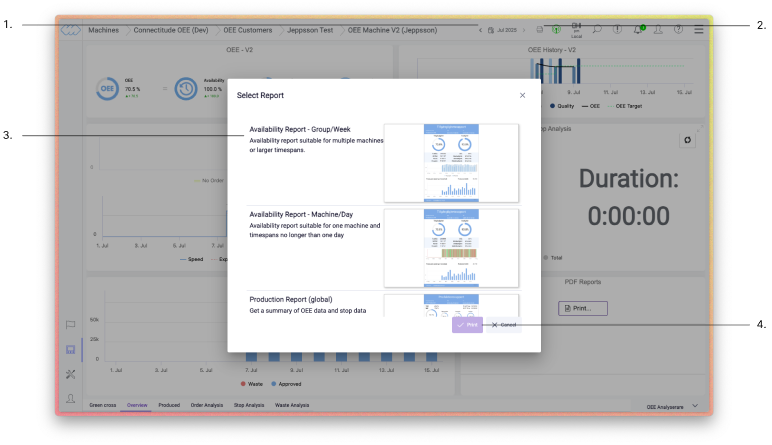
Generate a report
Navigate to the machine or group you want to retrieve data from and click the print icon (2). You will get an overview of available reports with predefined values – in most cases there is already an option that fits your need(3).Once you have selected the report you want to generate, press Print (4). You can choose the report time span in the time selector (1).
Create custom reports
If the predefined reports do not cover your needs, you can create and customize your own reports in the configuration interface.
Note: Need help building a report or thinking through the content? Our Customer Success team is happy to help.
Schedule reports
Reports can be scheduled and sent automatically to selected users or roles. Once set up, no manual handling is required.